|
Wear the heart rate sensor to measure heart rate.
Detach the connector from the strap and rinse the strap under running water after every use. Sweat and moisture may keep the electrodes wet and the heart rate sensor activated. This will reduce the heart rate sensor battery life. For more detailed washing instructions, see Important Information. |  |
For video tutorials, go to http://www.polar.com/en/support/video_tutorials.
↑ Back to topWear the training computer and heart rate sensor.
Press and select Start training, or long-press when you want to start recording your training session.
To modify sounds, heart rate view or other training settings before starting the training session, select Training Settings. See section Settings for more information.
Your training session is saved only when the recording has been on for more than one minute.
Strength training with Polar FT80 helps you effectively improve your muscle strength and power by guiding your recovery heart rate between exercise sets during workout.
Create up to three workouts in polarpersonaltrainer.com and download the workout(s) to your FT80. See Transfer Data for more information.
When you have downloaded workouts onto your FT80, press and press to select Start strength training. Press to start your warm-up session and after warm-up, press again. Start workout? is displayed. Select Yes and press . Select the workout and press . Select the exercise you want to perform from the list. Press and start your workout with the first set.
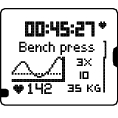 | Heart rate graph Name of the exercise Heart rate as a number and graph Number of sets, repetitions, and weights |
3. When you have completed a set, the FT80 tells you the optimal recovery time. Sit down to wait and see when your heart rate graph hits the dotted line on the display and you hear a beep. You have now recovered enough. Start next set! is displayed.
4. When you have completed all sets of an exercise press , and Exercise completed? is displayed. Select Yes to save the exercise data. The exercise set is now removed from your exercise list in this session.
5. Select the exercise you want to perform next and finish your workout.
6. After workout, carry out a suitable cool down session. To stop the cool down session, press twice. Transfer data to polarpersonaltrainer.com for easy follow-up of your fitness level development. See Transfer Data for more information.
If you have not yet downloaded workouts from polarpersonaltrainer.com, FT80 still guides your strength training informing you how long to rest between each set.
1. Press and select Start strength training.
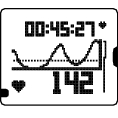 | Heart rate graph Heart rate as a number and graph |
2. When you have completed a set, the FT80 tells you the optimal recovery time. Sit down to wait and see when your heart rate graph hits the dotted line on the display and you hear a beep. You have now recovered enough. Start next set! is displayed. Perform the exercises and finish your workout.
3. After workout, transfer data to polarpersonaltrainer.com for easy follow-up of your fitness level development. See Transfer Data for more information.
If you have activated the STAR Training Program, the performed strength trainings are automatically accumulated to the weekly training results.
↑ Back to topStarting every session with OwnZone determination guarantees safe, effective and individual heart rate zones.
Check your OwnZone at least:
when you change training environment or sport.
when you train after more than a week’s break.
if you have not recovered from previous session/you are not feeling well/are stressed.
after changing your user information.
OwnZone determination takes only five minutes, and can be performed as a warm-up in any sport.
If training program is activated and you actively use this determination, FT80 incorporates your long-term results when updating program targets.
Wear the training computer and heart rate sensor.
Press and select Start with OwnZone. Follow the instructions on the display. Start slowly keeping your heart rate below 100 bpm/ 50% HRmax. After each minute, increase your speed gradually about 10 bpm/ 5% HRmax.
Walk slowly for 1 min.
Walk at a normal pace for 1 min.
Walk fast for 1 min.
Jog for 1 min.
Run for 1 min.
Speed up.
When the individual OwnZone limits are determined at some point during the determination, New limits in use is displayed. Proceed normally with training.
Troubleshooting
If OwnZone determination fails, and you have determined your OwnZone limits earlier, Previous limits in use is displayed. If you have not determined your OwnZone limits, Age-based limits in use is displayed. The OwnZone determination fails if the heart rate rises too fast during the OwnZone determination/if the heart rate is too high at the beginning of the test.
The following information is displayed during a training session. Press to change views. Your training duration is displayed in every view.
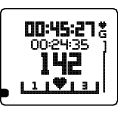 | In zone 1, 2 or 3 (displayed during cardio training) Training time in the indicated zone Heart rate Heart symbol indicates the zone you are in |
|
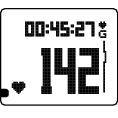 | Heart rate Heart rate during training |
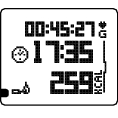 | Time of day Calories Expended calories during training |
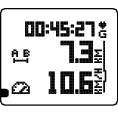 | Distance Distance of training (optional GPS sensor or foot pod required to view distance data) Speed Speed of training (optional GPS sensor or foot pod required to view speed data) |
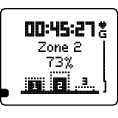 | Week target (displayed during cardio training if the training program is active) Weekly target intensity zones and the actual training time in each zone |
To access Quick menu during training, press and hold LIGHT. The quick menu is a shortcut to locking buttons, adjusting training sounds, and if foot pod is in use, calibrating it.
Lock a zone: When you are in a desired zone during a training session, lock it by pressing for one second. For instance, when you have achieved your week target for zones 1 and 3, you can lock zone 2. The zone alarm helps keep you inside the locked zone.
HeartTouch: Check the time during training recording by bringing the wrist unit near the heart rate sensor. Set the HeartTouch function On/Off in Menu > Settings > Training Settings > HeartTouch.
↑ Back to topPress to pause training recording.
Press again to stop recording altogether.
You will receive instant feedback on your training session. See After Training for more information.
Detach the connector from the strap and rinse the strap under running water after every use. Wash the strap regularly in a washing machine at 40ºC/104ºF after every fifth use.
↑ Back to topUse the stopwatch for timing (for instance, for recording lap times ).
Select Menu > Applications > Stopwatch.
Start timing by pressing .
During timing, press to start recording a new lap.
Press to stop the stopwatch.
Your timing results remain in the memory of your FT80 until you reset the stopwatch. Scroll the timing results with , and reset the stopwatch by pressing and holding .
↑ Back to top