The adaptive, personalized, and in-built Polar STAR Training Program provides you with the optimum intensity and time targets. The FT80 gives you feedback on your performance after each training session and once a week.
The FT80 creates a training program based on your personal information (weight, height, age, sex), fitness level, activity level, and training goal.
By analyzing your weekly training results and fitness level, the FT80 gives you training guidance for the following week. The training program adapts to your training habits and to your changing fitness level.
In Time view, select Menu > Applications > Training program > Create new program and Yes.
If you have not performed the Polar Fitness Test or a new test result is needed, the FT80 asks you to perform the test. For more information, see Test Your Fitness Level.
Select your training target:
Improve fitness to improve your current cardiovascular (involving the heart and blood vessels) fitness level and if you are able to train regularly.
Maximize fitness to maximize your current cardiovascular fitness level, and if you have been training regularly for at least 10-12 weeks and training nearly every day is not a problem for you.
Training program created! is displayed.
Next, View week targets? is displayed. Select Yes to view time and calorie targets for your first training week. If you select No. Training program active! is displayed and the FT80 returns to Time view.
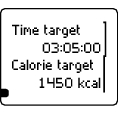
Time target
Target training time for the week
Calorie target
Target calorie expenditure for the week
Press and to view your target training time for three different target intensity zones. Press to change the view. See the following page for more information on the zones.
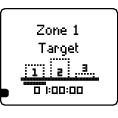
Time target for zone 1
The bars indicate the target times in different intensities. The bars fill up as you train. The target time for intensity zone 1 for the week is displayed in the lowest row.
You have now activated your training program. Press and hold to return to Time view.
To view your weekly targets later, select Menu > Applications > Training Program > View week targets.
| Target Zone | Intensity % of HRmax | Training benefit |
Zone 3 | HARD: 80-90% |
|
Zone 2 | MODERATE: 70-80% |
|
Zone 1 | LIGHT: 60-70% |
|
Troubleshooting
User information missing is displayed > Enter the missing user information.
Fitness test result required is displayed > You need to perform the Fitness Test.
Read more about training under Training Articles at http://articles.polar.fi.
To change your fitness goal (from Improve Fitness to Maximize Fitness):
Select Menu > Applications > Training program > Change program to create a new program.
To end your active training program:
Select Menu > Applications > Training program > End program > End Program? and Yes.
The results of your program are displayed:
Start date/Duration: The start date and the duration of the training program.
Excel. weeks/Calories: The number of excellent training weeks vs. total number of training weeks and the calories expended during the program.
Before/After: Your Fitness Test result (OwnIndex) before and after the program.
To view the results of your previous program at a later date, select Menu > Applications > Training program > Results of past prog..
To train right and to monitor your progress, it is important to know your current fitness level. The Polar Fitness TestTM is an easy and quick way to measure your cardiovascular fitness and aerobic capacity. The test is performed at rest.
The test result is a value called OwnIndex. OwnIndex is comparable to maximal oxygen uptake (VO2max ), which is commonly used aerobic capacity measure. For more information, see Interpret your fitness test results.
The OwnIndex value affects the accuracy of the training program and calorie calculation during training.
The test is developed for healthy adults. To ensure the test results are reliable, make sure to:
avoid distractions. The more relaxed you are and the more peaceful the testing environment is, the more accurate the test result will be (for instance, no television, telephone or talking).
avoid heavy physical exertion, alcohol and unprescribed pharmacological stimulants on the test day and the day before.
avoid eating a heavy meal or smoking 2-3 hours prior to the test.
always perform the test in similar conditions and same time of day.
enter accurate user information.
Wear the heart rate sensor, lie down and relax for 1-3 minutes.
In Time view, select Menu > Applications > Fitness test > Start test. The fitness test begins as soon as the FT80 locates your heart rate.
Approximately 5 minutes later, a beep indicates the end of the test, and your test result is displayed.
Press . UPDATE VO2max? is displayed.
Select Yes to save the test result in your user settings and OwnIndex results. Select No only if you know your VO2max value, and if it differs more than one fitness level (see the table on the next page) from the OwnIndex result. Your OwnIndex value will only be saved in OwnIndex results.
Troubleshooting
Set activity level of past three months is displayed > Set your activity level (see Settings for more information). Activity level set is displayed and the test begins.
Fitness Test Failed is displayed or no heart rate shown > Test fails. Check that the heart rate sensor electrodes are moist enough and that the elastic strap is snug enough around your chest. If the fitness test fails, your previous OwnIndex value is not replaced.
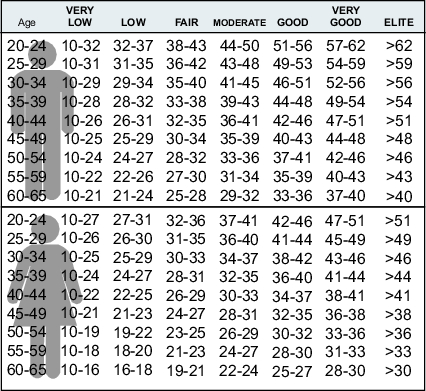
Interpret the OwnIndex values by comparing your individual values and changes in them over time. OwnIndex can also be interpreted based on gender and age. Locate your OwnIndex in the table to the right, and see how they compare to others of the same gender and age.
This classification is based on a literature review of 62 studies where VO2max was measured directly in healthy adult subjects in the USA, Canada and seven European countries. Reference: Shvartz E, Reibold RC: Aerobic fitness norms for males and females aged 6 to 75 years: a review. Aviat Space Environ Med; 61:3-11, 1990.