


































Vantage V3 - 5.0.13 firmware update
There is a new firmware update available for Polar Vantage V3. You can update your watch on your mobile via the Flow app or on your computer via FlowSync.
Version number: 5.0.13
Release date: January 19th, 2026
Dark mode for all maps
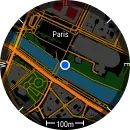
Maps are now available in a dark theme for more comfortable viewing at night or in low-light conditions. The map theme can be changed in the map navigation menu.
Map zooming improvements
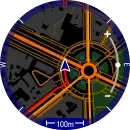
Access map-zoom mode with a single OK button press from the map navigation view. You can now also zoom in and out using a pinch gesture in addition to the buttons. The map navigation menu can now be accessed by pressing OK in the map zoom mode or by pressing OK twice from the map navigation view.
Improved alarm features
You can now set multiple alarms on your watch, each set to occur once or on a repeating schedule. Alarms can be created from the main menu, the quick settings menu, or the alarm widget.
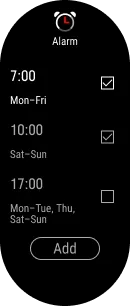
When you snooze an alarm, the alarm widget now displays the time remaining until the snoozed alarm. Alternatively, you can view the remaining time from the quick-settings menu.
For more information on the alarm features, see Alarms in the user manual.
SpO₂ test history graph
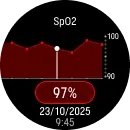
From the new SpO₂ test history graph, you can view your seven most recent test results. You can select a result to display by swiping or using the UP and DOWN buttons. To view detailed information, tap the button showing the SpO₂ percentage or press OK.
Menu updates
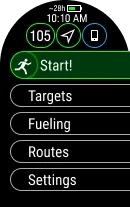
FuelWise™ fueling reminders, previously located in the main menu under Fueling, are now located in the pre-training mode for easy access. From the pre-training mode, you can also access Routes and Targets, which were previously available via Settings in pre-training mode. Targets includes the training targets you’ve saved as favorites in Flow and synced to your watch, as well as your daily FitSpark training suggestions.
New widgets
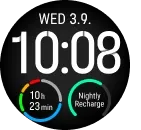
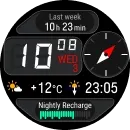
Two new widgets have been added to the watch face settings: Nightly recharge and Week summary. The Nightly recharge widget displays a graph of your Nightly Recharge status from the previous night. Tapping the widget allows you to quickly access detailed Nightly Recharge information. The Week summary widget shows your total training time and illustrates the time spent in different training zones. Tapping this widget allows you to quickly access the Weekly Summary details.
Route direction in preview
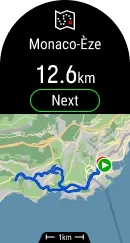
Before starting your session, you can now see the starting direction in the route preview, helping you start off the right way.
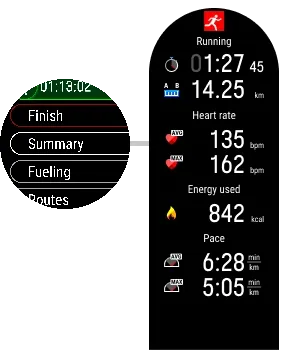
Summary view in pause mode
Whenever a training session is paused, the summary view will now display much more information, including duration, distance, average heart rate, max heart rate, burnt calories, average speed, and max speed.
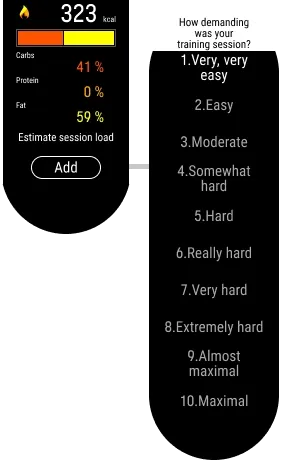
RPE grading after training
After each training session, you can rate your effort directly on the watch in the training summary using the 1-10 Rate of Perceived Exertion (RPE) scale.
Flashlight intensity and color settings
We’ve added new intensity levels and a color option for the flashlight. You can now adjust these settings when turning on the flashlight from the Quick settings menu or the Flashlight widget.

Other improvements/fixes in this release
- OHR signal quality is now shown before training with a color indicator. See Start a training session in the user manual for details.
- Current time is now displayed while charging
- When Do Not Disturb is enabled, your display stays dim in ambient mode instead of lighting up on the first button press
- 3D speed calculations adjusted for more accurate performance readings in elevation-changing routes
- Resolved an issue causing duplicate or repeated notifications when paired with iOS devices
- Other minor updates and bug fixes