Training analysis in the Flow app
Polar Loop automatically syncs with the Flow app after you finish a training session, if your phone is within Bluetooth range. You can also manually start the sync via the app. For more information, see Syncing. After syncing, the training session will appear in the Diary and Calendar views of the Flow app. You can open the training analysis view by tapping the session. The information shown in your training summary depends on the sport profile and data collected. For example, your training summary can include the following information:
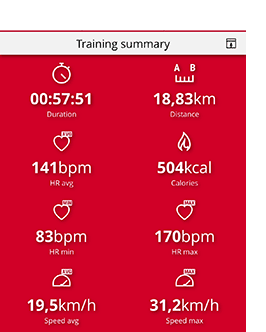
Training summary
-
Duration of the session
-
Distance covered in the session*
-
Heart rate (avg, min, max)
-
Calories
-
Speed (avg, max)*
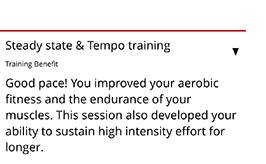
Training benefit
-
Textual feedback on the effect of your training session. The feedback is based on training time distribution between heart rate zones, calorie expenditure and duration of the session.
For more information, see Training benefit.
Training Load Pro
-
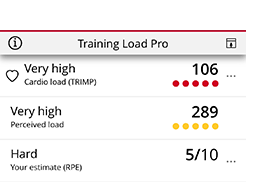
Cardio load shows your cardiac response to your training session
-
Perceived load describes the hardness of your training session based on your own estimate and session duration
-
Your estimate (RPE, rate of perceived exertion)
For more information, see Training Load Pro.
Training zones
-
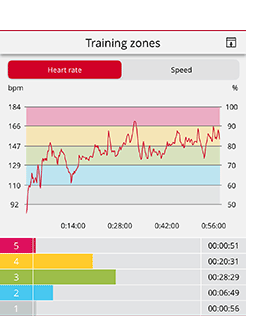
Training time spent in different heart rate zones
-
Training time spent in different speed zones*
*Speed and distance information is only available in training summaries if the session is recorded using the Flow app and the phone GPS is enabled in the training settings.
Energy sources
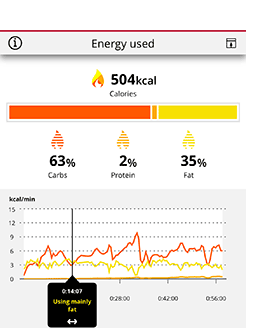
The energy sources breakdown shows how much of different energy sources (carbohydrates, proteins, fats) you used during your session. For more information, see Energy Sources.
Energy sources are shown in the Flow app’s training analysis view for automatically recorded training sessions.