Sensor settings
You can adjust the settings of your H10 heart rate sensor through the Polar Flow app after you have paired the sensor with the app.
-
Wear the heart rate sensor.
-
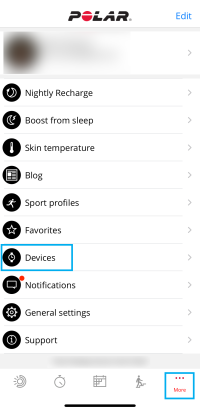
Open the Flow app and go to Devices on the main menu.
-
If you have multiple devices, swipe left or right to browse the devices list and find Polar H10.
-
Tap Connect to see the settings.
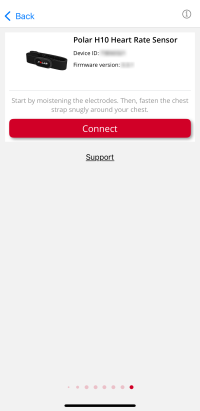
Heart rate visible to all: On by default. When on, you are broadcasting your live heart rate publicly meaning that any compatible app or device nearby can pick up your heart rate. Turn off to optimize sensor battery life and make your sensor invisible to other compatible apps or devices.
ANT+: On by default. When ANT+ is on, your sensor is visible to compatible gym equipment or training devices using ANT+ and they can pick up your heart rate.
2 Bluetooth devices: On by default. When the setting is on, any two compatible apps or devices nearby can pick up your heart rate simultaneously. For example, you can share your heart rate with your Polar watch and gym equipment at the same time.
GymLink: On by default. When turned on, you can use your sensor with compatible (5 kHz) gym equipment or training devices, for example, with older Polar watches.
Factory reset: Resets your heart rate sensor to its factory settings, and clears the sensor memory.