Pairing
Start using your H10 by pairing it with the Polar Flow app. This will ensure you receive the latest firmware updates.
Please note that the pairing should be done through the Flow app, not in your phone's Bluetooth settings.
If you use the H10 with a Polar watch or another device, pair it with them as well.
Pair with Polar Flow app
-
Download Polar Flow app from App Store or Google Play.
-
Sign into your Polar account or create a new one.
-
Wear the sensor.
-
Go to Start in the main menu.
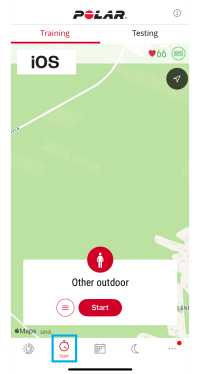
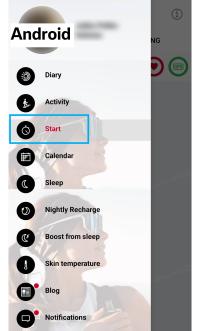
-
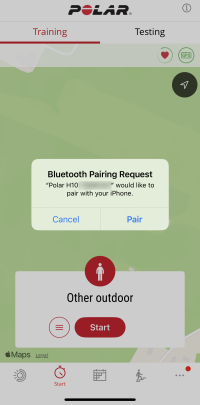
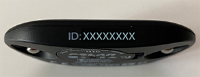
A Bluetooth pairing request will appear on the Flow app display. Ensure the sensor ID number in the pairing request matches the one printed on the side of your sensor. Accept the Bluetooth pairing request by tapping Pair in the app. Once pairing is complete, your heart rate will be displayed at the top of the Training view in the app.
Pair with a Polar watch
Check the user manual of your Polar watch at support.polar.com for specific pairing instructions.
Delete pairing
Delete pairing with the Flow app
To delete pairing with the Flow app, you need to 1) remove the sensor from the Products list in the Polar Flow web service and 2) remove the sensor from the list of paired Bluetooth devices on your mobile device.
-
Go to flow.polar.com and sign in.
-
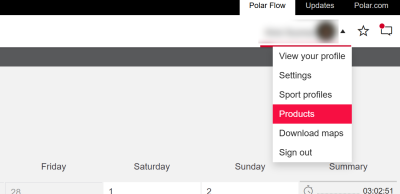
Click your name in the upper right corner and choose Products.
-
Find the product from the list and click the delete icon (X).

-
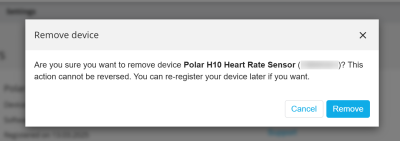
Confirm by clicking Remove.
-
On your mobile device remove your H10 from the list of paired Bluetooth devices:
- iOS: Settings > Bluetooth > tap “i” next to Polar H10 > Forget This Device.
- Android: Settings > Bluetooth > tap the cogwheel icon next to your Polar H10, and FORGET.
Delete pairing with a Polar watch
For instructions, see the user manual of your Polar watch at support.polar.com.