



























How to use ZoneLock (Grit X/Pacer/Street X/Vantage)
Applies to: Grit X Grit X Pro Pacer Pacer Pro Vantage M Vantage M2 Vantage V2 Vantage V3 Grit X2 Pro Vantage M3 Grit X2 Street X
ZoneLock lets you lock into the training zone (heart rate, speed/pace, or power) you’re currently in on the fly. It works with heart rate zones in all sport profiles in the fullscreen heart rate graph view or any view with heart rate data. For speed and power zones, first add the fullscreen speed and power training views to the sport profiles where you want to use ZoneLock in the Flow app or web service settings.
How to use ZoneLock
Press and hold the OK button to lock into the zone you’re in. Your watch will alert you if you go outside your target zone.
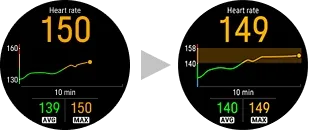
Press and hold the OK button to turn ZoneLock off.
How to add fullscreen training views to a sport profile
In the Polar Flow mobile app:
- Go to the main menu and choose Sport profiles.
- Choose a sport profile and tap Edit to open the sport profile settings.
- If you have more than one device in your Flow account, make sure the correct device is selected at the top of the page. You can change the device by swiping.
- Scroll down to Training views, and under Additional views, choose Speed/pace or Power.
- When you're ready, tap Done. Remember to sync the settings to your watch.
In the Polar Flow web service:
- Click your name/profile photo in the upper right corner.
- Go to Sport Profiles, and choose Edit on the sport profile you want to add the training view to.
- Choose Related to device.
- Choose Training views > Add new > Full-screen, then choose Speed/pace graph or Power graph.
- When you're done with the settings, click Save. Remember to sync the settings to your Polar device.
Shop maintenance
Sorry, our shop is currently down for planned maintenance. To track the progress of the break, head over to https://status.polar.com/