Compass
To use the compass during sessions you need to add it any sport profiles you wish to view it in.
In the Flow mobile app:
- Go to the main menu, and choose Sport profiles.
- Choose a sport profile and tap Edit to open the sport profile settings.
- If you have more than one device in your Flow account, make sure Vantage V3 is chosen at the top of the page. You can change the device by swiping.
- Scroll down to Training views, and under Additional views, choose the Compass view.
- When you're ready, tap Done. Remember to sync the settings to your watch.
In the Flow web service:
- Click your name/profile photo in the upper right corner. Go to Sport Profiles, and choose edit on the sport profile you wish to add it to.
- Choose Related to device.
- Choose Vantage V3 > Training views > Add new > Fullscreen > Compass and save. Remember to sync the settings to your watch.
Using the compass during a session
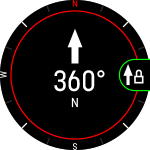
During a session you can scroll to the compass view with the UP/DOWN buttons. The display shows your bearing and the cardinal directions.
Calibrating the compass
You may be asked to the calibrate the compass during a session. If so, follow the instructions on the display to calibrate it.
You can also manually calibrate the compass via Settings. Pause your session, open Settings, and select Calibrate compass. Follow the instructions on the display.
Perform the calibration while wearing the watch on your wrist.
Lock your bearing
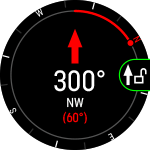
In the compass training view press OK to lock your current bearing. The display will then show the deviation from your locked bearing in red.
Note that the compass needs to be calibrated first.
Using the compass outside of training sessions
When not training, you can access the compass through the Navigation view. Add the navigation view from Settings > Views. After adding it, swipe left or right from the watch face until you reach the view, and press OK to open the details.
Lock your bearing
In the compass view press OK to lock your current bearing. The display will then show the deviation from your locked bearing in red.
Calibrating the compass
To calibrate the compass scroll all the way down and choose Calibrate.
Perform the calibration while wearing the watch on your wrist. Calibrate the compass regularly to ensure optimal accuracy.


The Compass widget allows you to quickly check your direction. The red end of the compass needle points to north. Tapping the widget opens the compass in the Navigation view. The compass must be calibrated before the widget can be used. You can add the widget to the watch face in the Watch face settings.