Voice guidance
The voice guidance feature helps you focus on your training by providing relevant training data straight to your headphones. The information you receive in audio format includes changes in heart rate and guidance during training phases. You can use the voice guidance feature when recording your training session with the Flow app.
You can set the voice guidance feature on in the Training settings in the Flow app. Tap the  icon to open the Training settings page.
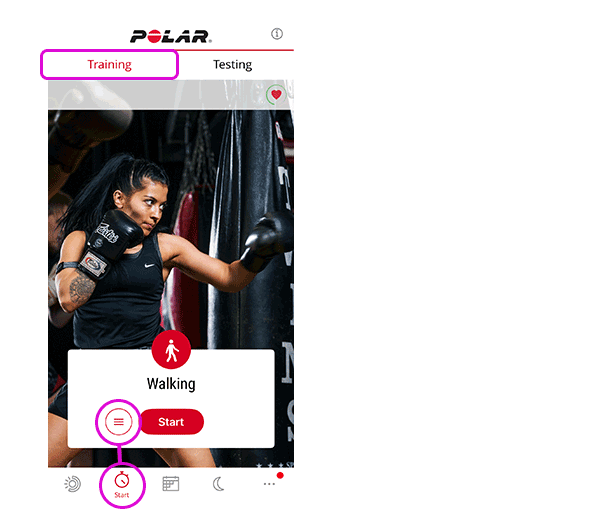
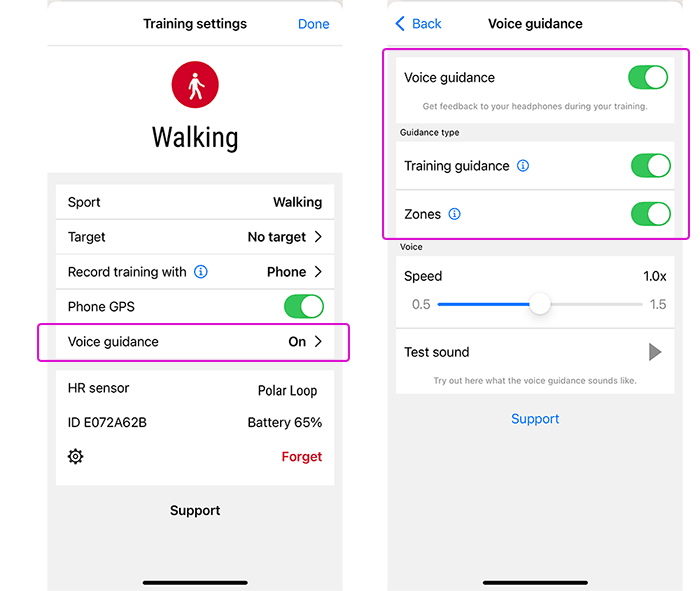
Tap to open the Voice guidance setting and turn the feature on. Then choose what type of information is included in the voice guidance:
-
Choose Training guidance to get guidance during training phases.
-
Choose Zones to find out about changes in your heart rate.
Note that in addition to the information you choose from the above options, you will receive audio feedback when
-
you start, pause, continue or stop the training session and when you receive a training summary
-
real-time connection between phone and watch is lost/recovered
-
the device battery is low