Polar Loop LEDs
When the device is charging
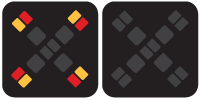
During charging, the four red LEDs light up in a repeating clockwise sequence. When the battery is fully charged, all four red LEDs remain on.

When the device is searching for a connection
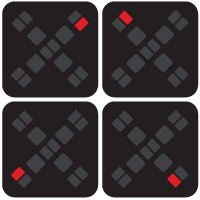
If you unplug Polar Loop from the charger before it is set up and paired with a phone, the device continues searching for a connection to a phone for 30 minutes before turning off. During the search, the four red LEDs light up one at a time in a repeating clockwise sequence, faster than during charging. To restart the search, plug the device into a charger again. Then follow the instructions in the Flow app to set up your Polar Loop.
The same repeating red LED pattern appears after the device restarts and indicates that you need to sync your device with the Flow app. Syncing restores the correct date and time settings on the device.
When the device is updating firmware
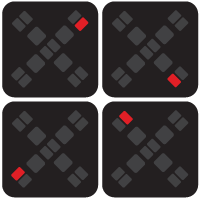
During a firmware update, the four red LEDs light up one at a time in a repeating counterclockwise sequence.
When the device is on, but not worn
The red and green LEDs are on when the device is on and ready to measure your heart rate, but the optical heart rate sensor is not in contact with your skin.

When the device is measuring your heart rate
When you wear the device and the optical heart rate sensor is in contact with your skin, the device starts measuring your heart rate. The LEDs that are on during measurement vary depending on the situation:
-
At rest (for example, while sleeping, lying down, or sitting): The red and green LEDs are on.
-
During activity: The red and green LEDs and the four corner LEDs are on.

When the device memory is almost full
When the device memory is almost full, the corner LEDs flash repeatedly. If you see this LED pattern, make sure the device is connected to your phone via Bluetooth, then sync it with the Flow app to free up memory. If the LEDs continue flashing after syncing, perform a factory reset.