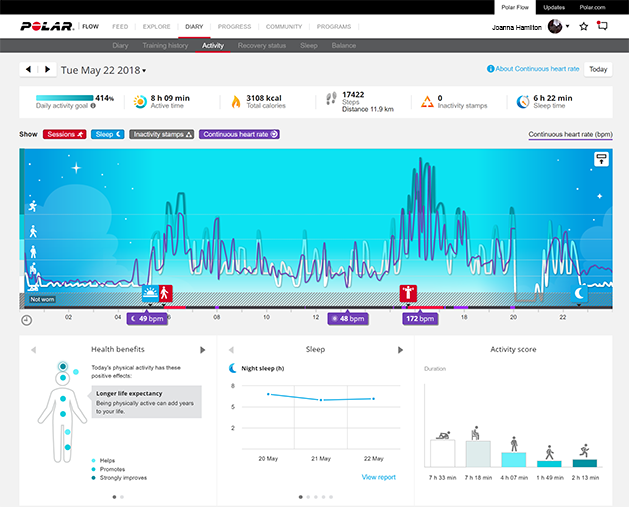
24/7 Activity tracking
Polar Loop tracks your activity with an internal 3D accelerometer that records your wrist movements. It analyzes the frequency, intensity and regularity of your movements together with your physical information, allowing you to see how active you really are in your everyday life, on top of your regular training.
For accurate measurement, it’s important that the device is positioned correctly on your wrist. See instructions in Wearing Polar Loop. Also, make sure that you are wearing the device on the wrist you selected in the Flow app device settings. For the most accurate activity tracking, we recommend wearing Polar Loop on your non-dominant hand.
Activity goal
You'll get your personal activity goal when you set up your device and create your Polar account. The activity goal is based on your personal data and activity level setting, which you can find in the Polar Flow app or in the Polar Flow web service.
If you want to change your goal, open the Flow app, tap your name/profile photo in the menu view, and swipe down to see Activity goal. Or go to flow.polar.com and sign in to your Polar account. Then click your name > Settings > Activity goal. Choose one of the three activity levels that best describes your typical day and activity.
The time you need to be active during the day to reach your activity goal depends on the level you have chosen and the intensity of your activities. Meet your goal faster with more intense activities or stay active at a slightly more moderate pace throughout the day. Age and gender also affect the intensity you need to reach your activity goal. The younger you are, the more intense your activity needs to be.
Activity guide
The Activity Guide feature shows how active you've been during the day, and tells you how much you need to still do to reach the recommendations for physical activity per day. You can check how you’re doing in reaching your activity goal for the day either from the Flow app or web service.
Activity benefit
Activity benefit gives you feedback on the health benefits that being active has given you, and also on what kind of unwanted effects sitting for too long has caused to your health. The feedback is based on international guidelines and research on the health effects of physical activity and sitting behavior. The core idea is: the more active you are, the more benefits you get! Both the Flow app and Flow web service show the activity benefit of your daily activity. You can view the activity benefit on daily, weekly and monthly basis. In the Flow web service, you can also view the detailed information on health benefits.
Inactivity alert 
It's widely known that physical activity is a major factor in maintaining health. In addition to being physically active, it's important to avoid prolonged sitting. Sitting for long periods of time is bad for your health, even on those days when you train and gain enough daily activity.
Your Polar Loop detects if you’ve been inactive for too long during the day, and reminds you to move to help reduce the negative effects of prolonged inactivity on your health. Inactivity alerts are sent via the Flow app.
You can turn inactivity alerts on or off in the Flow app's device settings. To receive these alerts, ensure that notifications are allowed for the Flow app in your phone settings, and that the app is running, at least in the background.
Inactivity alert reminds you to get up after 55 minutes of sitting and helps you add the active breaks to your daily routines. Stand up and find your own way to be active; take a short walk, stretch, or do some other light activity to benefit your health. If you're not active in the next five minutes you'll get an inactivity stamp. Inactivity stamps are shown in Flow app and web service where you can follow your daily amount of inactivity stamps.
Besides the many details you get about your physical activity and all the health benefits that come with it, it's also good to see the inactive periods and when you've been still for too long. This way you can check back on your daily routine and make changes toward a more active life.
Activity data in Flow app and web service
You can see your activity data in the Polar Flow app and web service. With the Flow app you can follow and analyze your activity data on the go. The Flow web service gives you the most detailed insight into your activity information. With the help of the activity reports (under the REPORTS tab), you can follow the long-term trend of your daily activity.
Learn more about the 24/7 Activity tracking feature in this in-depth guide.
Continuous heart rate
Continuous Heart Rate is a feature that complements the 24/7 Activity Tracking feature of Polar devices. Together they track all your daily physical activity automatically. While the 24 /7 Activity Tracking feature records your wrist movements to track your activity, the Continuous Heart Rate feature tracks your heart rate around the clock. It enables more accurate measurement of daily calorie consumption and your overall activity because also physical activities with very little wrist movement, such as cycling, can be tracked. The Continuous Heart Rate feature is automatically on in your Polar Loop.
You can see your Continuous Heart Rate data in Polar Flow, either in web or in the mobile app. Learn more about the Continuous Heart Rate feature in this in-depth guide.