Pairing sensors with your watch
Pair a heart rate sensor with your watch
When you're wearing a Polar heart rate sensor that's paired with your watch, the watch does not measure heart rate from the wrist.
Polar H9, Polar H10
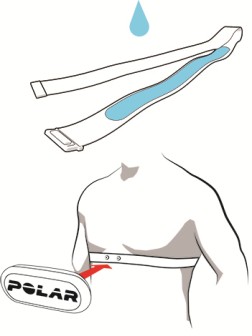
- Wear the moistened heart rate sensor.
- On your watch, go to General Settings > Pair and sync > Pair sensor or other device and press .
- The watch starts searching for your sensor.
- Once the heart rate sensor is found, the device ID, for example, Polar H10 xxxxxxxx is displayed. Press to start pairing.
- Pairing completed is displayed when you are done.
Polar OH1+, Polar Verity Sense
- Place the sensor into the armband holder with the lens facing up.
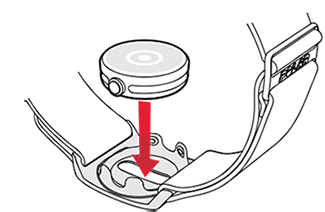
- Turn the sensor on by pressing the button until the light is switched on.
- Verity Sense: Make sure the sensor is in the heart rate mode marked with a heart icon. After choosing the mode, wait until all six leds light up, and you can then start pairing your Polar watch.
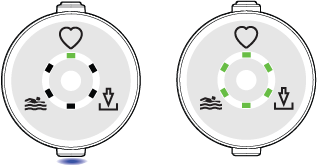
- On your watch, go to General Settings > Pair and sync > Pair sensor or other device and press .
- Once the heart rate sensor is found, the device ID, for example, Polar Sense xxxxxxxx is displayed. Press to start pairing.
- Pairing completed is displayed when you are done.
Delete a pairing
To delete a pairing with a sensor:
- Go to Settings > General settings > Pair and sync > Paired devices and press .
- Choose the device you want to remove from the list and press .
- Remove pairing? is displayed. Confirm by pressing .
- Pairing removed is displayed when you are done.