Quick menu
You can access the quick menu by tapping the quick menu icon  from pre-training mode and during a session when paused.
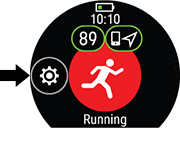
The options displayed in the quick menu depend on the sport you have chosen and whether you are using GPS.

|
Training suggestions:
Training suggestions shows you the daily FitSpark training suggestions. |
|

|
Favorites: In Favorites you'll find training targets that you have saved as favorites in the Flow web service, and synced to your watch. Choose a favorite training target you want to perform. After your choice, the watch returns to the pre-training mode where you can start the training session. For more information, see Favorites. |
|

|
Interval timer:
You can set time and/or distance based interval timers to precisely time work and recovery phases in your interval training sessions. To add interval timer to your training views for the session, choose Timer for this session > On. You can use a previously set timer or create a new timer by returning to the quick menu and choosing Interval timer > Set timers:
For more information, see During Training. |
|

|
Countdown timer:
To add countdown timer to your training views for the session, choose Timer for this session > On. You can use a previously set timer or create a new timer by returning to the quick menu and choosing Countdown timer > Set timer. Set the countdown time, and tap For more information, see During Training. |
When you choose a training target for your session, the Favorites and Training suggestions options are crossed out in the quick menu. This is because you can only choose one target for the session. To change the target, choose the crossed out option and you will be asked if you want to change your target. Confirm another target by tapping  .
.