Batteries
The battery level of your heart rate sensor is displayed on the receiving device.
The heart rate sensor has a user changeable battery. To change the battery yourself, follow the instructions below.
- Lever the battery cover open by using the clip on the strap.
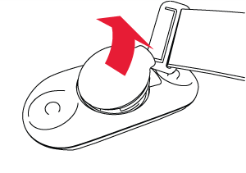
- Remove the old battery from the battery cover.
- Insert the new battery CR2025 inside the cover with the positive (+) side downwards. We recommend using batteries from reputable brands, such as Panasonic and Maxell, as their operational quality has proven to be reliable with Polar heart rate sensors.
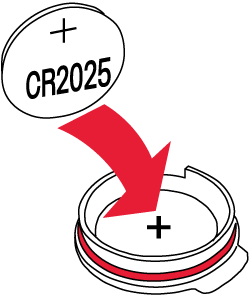
- Make sure the red sealing ring is in place, clean and intact. If the sealing ring is damaged, replace it with a new one*.
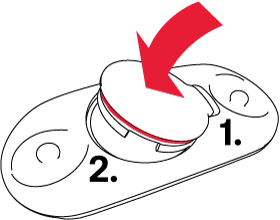
- Put the battery cover back in place. First, align the ledge on the battery cover with the slot on the connector. Hold the ledge in place with your finger, then press the other side of the battery cover back into place. You should hear a snap. Ensure that the battery cover is properly closed to keep the sealing ring in place and to maintain the sensor’s waterproofness.
* Replacement sealing rings can be purchased at Polar Service Centers.
Sensor pairing with a Polar or third-party device or app is required after a battery replacement if you are using a firmware version earlier than 3.3.1 for H10. See instructions.
Keep batteries away from children. If swallowed, contact a doctor immediately. Batteries should be disposed of in compliance with local regulations.