Introduction
Thanks for choosing Polar! In this user manual, we’ll walk you through the basics of using and caring for the Polar Team Pro training and coaching solution designed for monitoring and analyzing top-tier team sports performance.
Due to continuous development, this user manual is updated when new software/firmware versions are available. The latest user manual is available at support.polar.com/en/polar-team-pro, and you'll also find links to it in the Polar Team Pro web service and app.
Polar Pro Team Dock
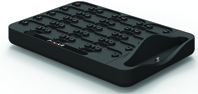
The dock is used to charge Polar Pro sensors and sync training data from them to the Polar Team Pro app and Polar Team Pro web service. It also serves as a base and charger for your iPad®.
Polar Pro Sensor
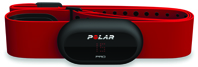
The Polar Pro sensor measures extensive player performance data, records the data in detail and sends it live to iPad® via Bluetooth® Smart allowing you to follow real-time information during training. After each training session, place the sensor into the Polar Pro team dock to charge it, and to sync the data to the Polar Team Pro iPad app and web service for detailed further analysis.
The Polar Pro sensor can be worn with the Polar Team Pro shirt that has a designated pocket for the sensor. The shirt is comfortable to wear and transfers moisture away from the skin.
Polar Team Pro App
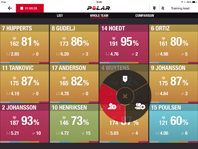
View extensive key performance data live from up to 60 players. Compare players and add notes and markers during training. Instant session summaries after training as well as a heat map view for player location analysis.
Polar Team Pro Web Service
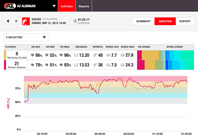
Powerful session analysis and reporting tools. Analyze session data in detail for the whole team, as well as compare players. Create custom reports for the whole team or individual players. Get a holistic view of the players' recovery and sleep data when using Polar watches outside of training sessions.
iPad (Sold Separately)
You'll also need an iPad® to complete the Polar Team Pro solution. With the Polar Team Pro app running on your iPad® you'll be able to follow live training data during sessions.
Make sure you have the latest iOS version on your iPad. To be able to sync data from the app to the web service, you need an internet connection.
Please note that the large 12.9 inch iPad Pro model does not fit in the dock connector, but can be connected to the Team Pro dock with a Lightning to USB cable via the USB port