Get to Know Polar Team Pro
What's in the Box
- Polar Pro Team Dock (includes four AC adapters)
- 10 Polar Pro Sensors and Straps
- Washing pouch
- Sensor folder
- Shoulder bag
Polar Pro Team Dock

1. AC power port:Recharge the dock with power cord that came in the box.
2. USB port: Alternative way to connect iPad to the dock with a Lightning to USB connector. Use the USB port if your iPad is not compatible with a Lightning cable or the iPad does not fit in the dock connector. Please note that when iPad is connected to the dock via the primary connection (placed into the dock and connected via Lightning connector), the USB port connection does not work at the same time. The USB port connection can only be used when iPad is not placed into the dock.
3. Micro USB port: For service done by Polar.
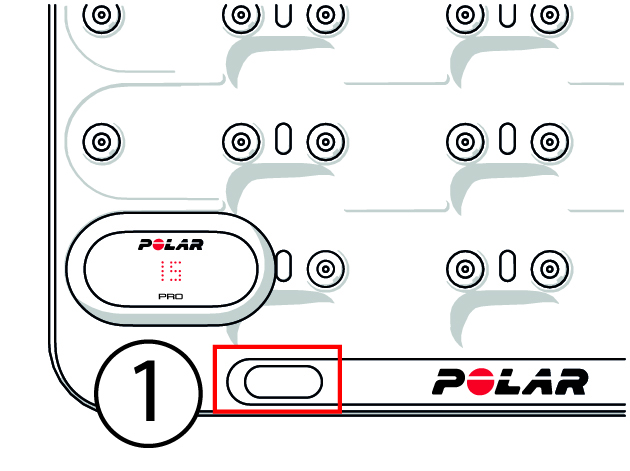
1. Dock button: Press to display the player numbers on the sensors when the dock is not connected to a wall outlet.
Polar Pro Sensor
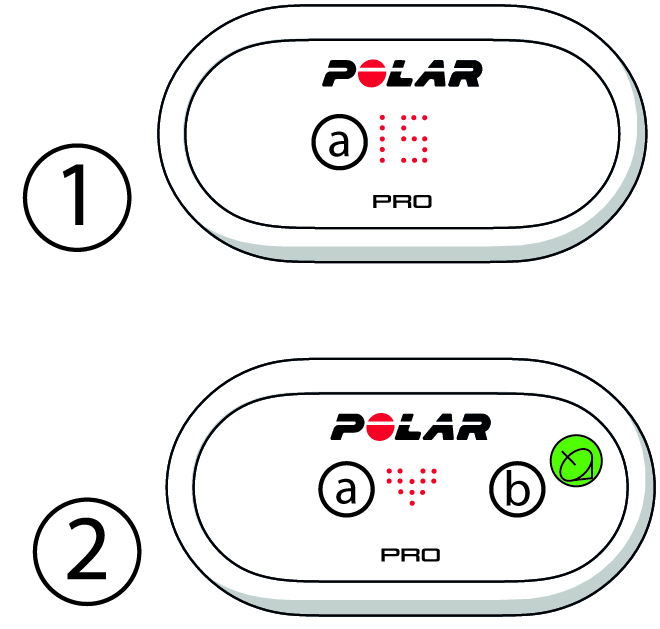
1a. Player number: When a sensor is in the dock the player number is shown. When a sensor is out of the dock, press the connectors on the backside of the sensor with your fingers to view the number. When wearing the sensor, tap the display twice to view the number.
2a. Heart rate: A heart symbol is shown when heart rate is detected.
2b. GPS: The satellite symbol stops blinking when GPS signal is found.